Mixtura Font Adds Playful Variety to Creative Projects
Fonts are more than just a way to display text—they’re tools that shape how your message is perceived. Whether you're designing a birthday card, crafting signage for a small business, or adding flair to a digital marketing campaign, the right font can make all the difference. Enter Mixtura, a versatile and playful display font that brings a fresh energy to any project. Designed specifically with a mix of uppercase and lowercase characters in mind, Mixtura offers a clean yet fun aesthetic that’s perfect for creators who want their work to stand out without being overwhelming.
What Makes Mixtura Unique?
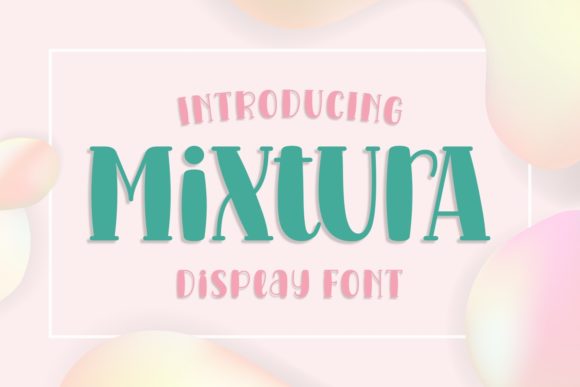
Mixtura isn’t just another decorative typeface. It’s crafted with intention to allow seamless blending between uppercase and lowercase letters, which makes it incredibly adaptable for different design needs. The contrast between the two styles adds visual interest while maintaining readability—key when you want to communicate clearly but also creatively.
This font combines soft curves with bold strokes, giving it a modern, approachable look that works well across both print and digital media. Its character set includes a wide range of glyphs, making it suitable for everything from short phrases to full sentences, depending on your design goals.
Why Choose a Display Font Like Mixtura?
Display fonts are used to grab attention and add personality to a design. Unlike standard sans-serif or serif fonts, they’re not meant for long paragraphs of body text. Instead, they shine in headlines, logos, social media graphics, and other eye-catching elements. Mixtura fits this niche perfectly by offering a balance between style and clarity.
If you're working on a creative project and need something that feels lively but still professional, Mixtura could be exactly what you're looking for. It’s particularly popular among hobbyists, educators, and small business owners who value originality and ease of use in their design tools.
How Mixtura Can Elevate Your Work
Whether you're using it for personal crafts or commercial designs, Mixtura has the potential to enhance your output. Let's explore some real-world applications where this font truly excels:
- Cutting Machine Projects: If you own a Cricut or Silhouette machine, you know the importance of choosing the right font. Mixtura is fully compatible with these tools, allowing you to cut intricate lettering onto vinyl, paper, wood, or fabric. Its unique blend of uppercase and lowercase letters makes it ideal for custom signs, t-shirt designs, and greeting cards.
- Brand Identity: For entrepreneurs and small businesses, building a memorable brand is essential. Mixtura can help create logos or headers that feel modern and inviting. Its playful nature suits lifestyle brands, boutique shops, or creative services that want to express warmth and innovation.
- Digital Content Creation: Bloggers, YouTubers, and marketers often rely on visually engaging content. With Mixtura, you can design catchy headlines for blog posts, Instagram banners, or YouTube thumbnails that reflect a cheerful and dynamic tone.
- Educational Materials: Teachers and educators can use this font to create interactive classroom posters, flashcards, or presentation titles that appeal to students’ senses while remaining legible and professional.
Beginner-Friendly Tips for Using Mixtura
If you're new to font pairing or using display fonts in your projects, here are a few tips to get started with Mixtura:
- Use it Sparingly: Since display fonts are best suited for short texts, apply Mixtura to key elements like headings or taglines rather than entire paragraphs.
- Pair Thoughtfully: Combine Mixtura with a simple sans-serif or serif font for body text to maintain balance and readability in your layout.
- Test Different Sizes: Experiment with how the font looks at various sizes. You might find that larger sizes highlight its playful side even more, while smaller ones remain clean and easy to read.
- Try Color Variations: Use color to emphasize certain words or phrases. A pop of pastel pink or a bold navy blue can really bring out the charm of Mixtura’s letterforms.
Real-World Examples of Mixtura in Action
Still unsure how to incorporate Mixtura into your work? Here are a few realistic use cases that might inspire you:
- Wedding Invitations: Add a touch of whimsy to your invitations with Mixtura as the main headline font. Its friendly appearance complements rustic or modern themes alike.
- Children’s Room Decor: Design wall art or labels for toys and books using Mixtura. The combination of uppercase and lowercase letters gives it an artistic, hand-drawn feel that’s perfect for kids' spaces.
- Event Signage: Create directional signs, welcome boards, or promotional banners for events such as festivals, workshops, or pop-up stores. The font’s versatility ensures it works well whether you’re going for a serious or lighthearted vibe.
- Social Media Posts: Use Mixtura in your Instagram stories or Facebook cover photos to catch attention quickly. Its clean lines prevent it from getting lost in busy layouts.
Things to Keep in Mind Before Choosing Mixtura
While Mixtura is a fantastic option for many projects, there are a few considerations to keep in mind before committing to it:
- Readability First: Although it’s a display font, always ensure the message is clear and legible, especially if it will be viewed from a distance or printed in small size.
- Context Matters: Not every project calls for a playful font. Consider your audience and the tone you want to convey. Mixtura is great for casual, creative, or youthful themes but may not fit formal or minimalist designs.
- License Check: Make sure to review the licensing agreement for Mixtura before using it commercially. Many high-quality fonts require proper attribution or have restrictions based on usage type.
- Compatibility: While it works well with cutting machines like Cricut and Silhouette, confirm that your software supports the format (usually .otf or .ttf) and that the characters render correctly before finalizing your design.
Getting Started with Mixtura: A Quick Guide
If you’re ready to try Mixtura, here’s a simple workflow to help you integrate it smoothly into your next project:
- Download the Font: Find a trusted source for downloading Mixtura. Ensure it comes with all necessary files and documentation.
- Install the Font: Install the font on your computer so it appears in design software like Adobe Illustrator, Photoshop, or Canva.
- Experiment in Design Tools: Open your favorite design program and start playing with Mixtura. Try mixing it with other fonts or adjusting the spacing and kerning for optimal results.
- Preview on Cutting Machines: If you're planning to use it with a Cricut or Silhouette, import the text into your cutting software and preview how the letters will cut or engrave before sending the job to the machine.
- Print or Share: Once satisfied with your design, print it out for physical use or export it for digital sharing. Don’t forget to check the quality at the intended size!
Why Mixtura Appeals to Both Creatives and Professionals
One of the reasons Mixtura has gained popularity is because it bridges the gap between creativity and professionalism. Casual users appreciate its fun, artistic vibe, while professionals admire its ability to maintain a polished look even in unconventional formats. This dual appeal makes it a go-to choice for anyone who wants to infuse personality into their work without sacrificing clarity.
For freelancers, having a diverse font collection is crucial. Mixtura adds variety to your portfolio, helping you differentiate your work from others in the same niche. Educators love it for creating engaging materials that resonate with younger audiences. And for bloggers or marketers, it’s a tool to craft compelling headlines that encourage clicks and shares.
Final Thoughts on Mixtura
In today’s design world, standing out is more important than ever. Fonts like Mixtura offer a unique solution by combining playfulness with functionality. Whether you're a seasoned designer or just starting out, this font provides endless opportunities to express your style and enhance your visuals.
Its compatibility with popular cutting machines like Cricut and Silhouette opens the door to hands-on creativity, making it a favorite among DIY enthusiasts. Plus, with thoughtful use, it can become a signature element in your branding or personal projects.
Ready to explore what Mixtura can do for your next creation? Start experimenting with its uppercase and lowercase combinations today and discover how a single font can transform your designs—from the ordinary to the extraordinary.